Roymall Newsletter Subscription Form
Take 20% off your order now - Get early access to deals and sales
Home>mall>Electronics
0Aimé

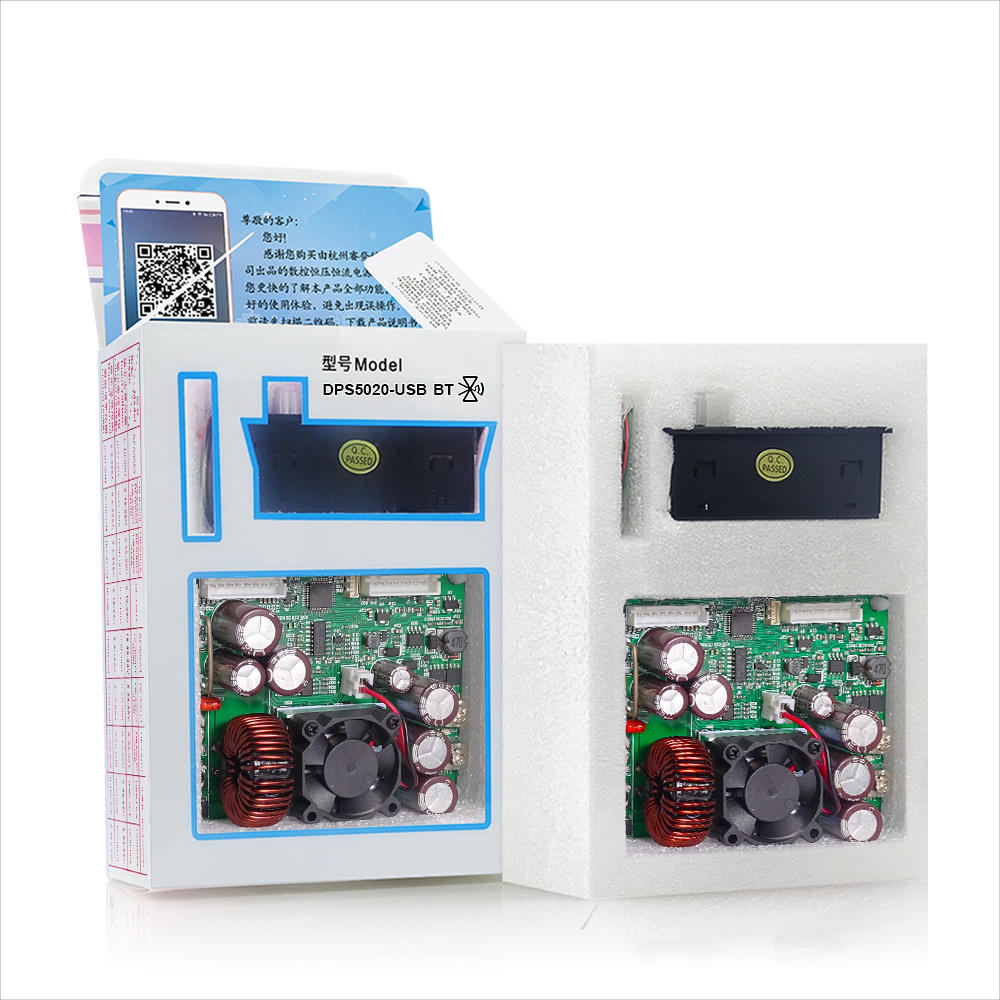
Module abaisseur de tension constante RIDEN® DPS5020, version communication USB, convertisseur de tension abaisseur, voltmètre LCD 50 V 20 A

4.7629
$49.99 /$60.99
  • *Name:

  • *Email:

  • *Phone:

  • *Quantity:

  • *Content:

  • Attachment:

    Supports JPG, JPEG, PNG, PDF, EXCEL, WORD, RAR, ZIP, 7z formats

$49.99 /$60.99
Shipping to: United States | Express delivery: 7-12 business days | Standard delivery: 15-25 business days

Paiement sécurisé garanti

Cadeau gratuit
Cadeau gratuit avec tout achat


Politique d'expédition
Livraison standard gratuite pour les commandes de plus de 9,9 $
Politique de retour
Les articles retournés seront acceptés dans les 40 jours suivant la réception des marchandises. Les articles personnalisés ne peuvent pas être retournés ou échangés. Les articles achetés avec une carte-cadeau électronique ne peuvent être échangés que; les remboursements ne sont pas applicables.

Cadeau gratuit

Bienvenue sur Roymall, votre site Web professionnel pour l'achat de cadeaux de grand magasin premium. Nous apprécions et valorisons grandement votre soutien, et nous voulons exprimer notre gratitude en ajoutant une touche supplémentaire d'excitation à vos achats. Lorsque vous magasinez avec nous, vous profitez non seulement de produits de haute qualité qui améliorent votre style de vie, mais vous recevrez également un cadeau gratuit exclusif avec chaque commande que vous passez. Prêt à explorer notre collection et à trouver vos cadeaux parfaits ? Parcourez notre sélection d'articles de grand magasin premium, passez votre commande et attendez avec impatience l'excitation de recevoir votre cadeau gratuit avec votre achat.

Politique d'expédition

Nous nous efforcerons de vous livrer les articles après réception de vos commandes et de nous assurer qu'ils arrivent en toute sécurité. Les détails de livraison seront fournis dans votre email de confirmation.Dans la plupart des cas, les commandes sont traitées dans les 2 jours. Dans des circonstances spéciales, cela peut être retardé comme suit : Lorsque vous passez une commande le samedi, le dimanche ou un jour férié, cela sera retardé de 2 jours.Normalement, il faut 5 à 7 jours ouvrables (du lundi au vendredi) sans être affecté par un retard de vol ou d'autres facteurs environnementaux.Parce que notre service d'expédition est mondial, les délais de livraison dépendront de votre emplacement, donc cela peut prendre quelques jours et veuillez patienter si vous êtes dans des districts ou des pays éloignés.

1. Politique de retour et d'échange

Nous n'acceptons que les articles achetés sur roymall.com. Si vous achetez auprès de nos distributeurs locaux ou d'autres détaillants, vous ne pouvez pas les retourner chez nous. Les articles en vente finale ou les cadeaux gratuits ne sont pas acceptés pour un retour.Pour être éligible à un retour, votre article doit être inutilisé et dans le même état que celui dans lequel vous l'avez reçu. Il doit également être dans son emballage d'origine.Après avoir reçu les instructions de retour de notre part, veuillez emballer vos articles retournés et déposer votre colis à la poste locale ou à un autre transporteur.
Nous traiterons votre retour ou échange d'article dans les 3 à 5 jours ouvrables après réception. Le remboursement sera traité et crédité automatiquement sur votre méthode de paiement d'origine.Aucun retour ou échange ne peut être accepté si le produit a été produit sur mesure, y compris la taille personnalisée, la couleur personnalisée ou l'impression personnalisée.Besoin de plus d'aide, veuillez nous contacter. service@roymall.com ou Whatsapp: +447549870296

2.Politique de remboursement

Vous recevrez un remboursement intégral ou un crédit magasin de 100% après réception et vérification du colis retourné. Le remboursement sera traité et crédité automatiquement sur votre méthode de paiement d'origine. Veuillez noter que les frais d'expédition et tous les droits ou frais ne sont pas remboursables. Les frais d'expédition supplémentaires ne sont pas remboursables une fois le colis expédié. Vous êtes responsable du paiement de ces frais et nous ne pouvons pas les annuler ou les rembourser, même si la commande nous est retournée.Une fois que nous avons reçu et confirmé votre article retourné, nous vous enverrons un email pour vous informer que nous avons reçu votre article retourné. Nous vous informerons également de l'approbation ou du rejet de votre remboursement.Si vous avez des problèmes concernant le processus de remboursement, veuillez nous contacter. service@roymall.com ou Whatsapp: +447549870296
General Information:

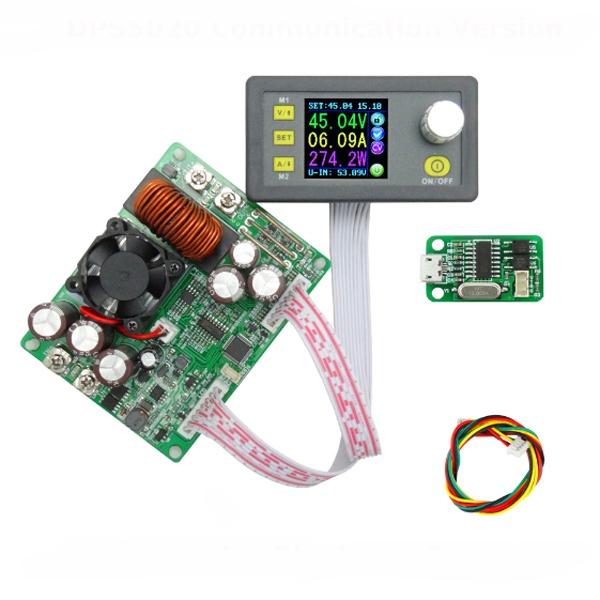
The constant voltage and constant current programmable control power supply module put the collection of analog integration and digital control functions in one. Its adjustable output voltage range is 0-50.00V, step by 0.01V. Its adjustable output current range is 0-20.00A, step by 0.01A. This module has power-down stored function and can store 10 groups preset value. And it also has the function of extracting quickly two groups stored value. Compared with the traditional analog power supply, it is more convenient to quickly extract the voltage or current required. LCD display on the module has the function digital voltmeter and ammeter. You can view the preset voltage, input voltage, output voltage, the preset current, output current, output power, etc. on the output state remind area, you can see that output opens or not, the state of constant voltage and constant current, output is normal or not, the key is locked or not, and the current data groups that is being used. On the setting data interface, you can adjust overvoltage value, overcurrent value, over-power value, data set and LCD brightness. This module has many advantages, small size, advanced function, good visual effect, high operability, high-precision, being used independently, being inset into the device and been widely applied.

Type:


DPS5020 Communication + USB version

Very important:

1. Before buying this product, please download the upper computer software and test, if it fits your computer , you can buy
2. The upper computer only support For Win7 and above.
3. This is file for upper computer installation and software, you can download:
https://www.mediafire.com/folder/3iogirsx1s0vp/DPS_communication_upper_computer


Technical parameters:

Input voltage range: 6.00-60.00V Output voltage range: 0V-50.00V
Output current: 0-20.00A Output power range: 0-1000W
Product Weight: about 222g Display module size: 79*43*41(mm) (L*W*H)
Open size: 71mm*39mm Power module size: 93*71*41(mm) (L*W*H)
Length of connecting line: 200mm Fixed hole center distance: 86mm, 64mm
Output voltage resolution: 0.01V Output current resolution: 0.01A
Output Voltage accuracy: ± (0.5% + 1 digit) Output Current accuracy: ± (0.5% + 2 digits)
NOTE: 1.You must make sure that the input voltage is 1.1 times higher than output voltage. Under large current circumstances, pay attention to heat elimination.
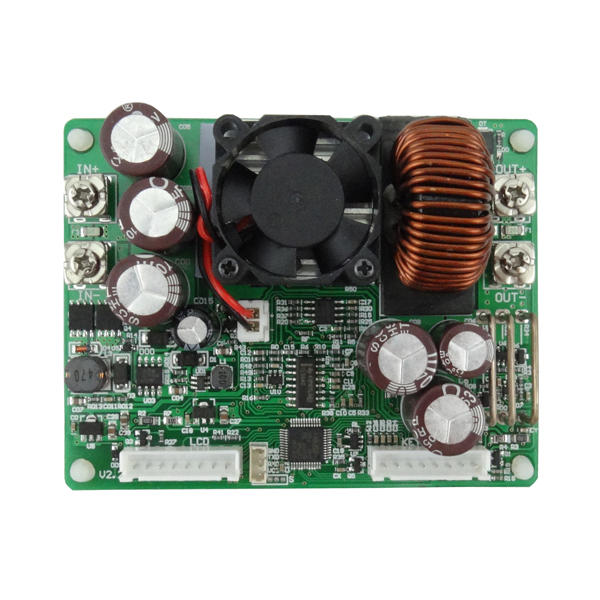
2. Connection between display part and power part should be according to the corresponding words. Otherwise it will not work by wrong connection

Connection description:


IN+: Input positive IN-: Input negative:
OUT+: Output positive: OUT-: Output negative
Note: Input voltage range is DC 6-60V and 60v is the limit voltage; please leave a room to use. Or else it will be burnt. The input must be DC power supply, not AC 220V, or else it will be burnt too. Though this module has reverse connection protection and output short circuit protection, you can muse be in strict accordance with connection description to connect. If you connect the supply power with output, the module will be burnt.

Panel description:

1-Voltage setting/Page up to choose/Shortcut extract M1 data group
2-Data setting/ Extract value of the specified data group/Store value into the specified data group
3-Current setting/Page Down to choose/Shortcut extract M2 data group
4-1.44 inch color LCD screen
5-Coding potentiometer/Data adjustment/Lock all buttons
6-Open or close output

Display interface description:

7-The preset value of output voltage
8- The actual value of output voltage
9-The actual value of output current
10-The actual value of output power
11-The actual value of input voltage
12-The preset value of output current
13-Key lock or unlock prompt
14-Output normal or not prompt
15-Constant voltage and constant current status prompt
16-Data set prompt
17-Open or close output prompt

18-Preset output voltage
19-Preset output current
20-Preset over- voltage
21-Preset over-current
22-Preset over-power
23-Preset screen brightness
24-Preset data set
25-The actual value of output voltage and output current

Operating instructions:

When connect the power supply, the screen shows welcome window firstly and then comes into main interface. On the main interface, the output set voltage value and the output set current value is on the top of the screen. The big font value on the left are the current real output voltage, the current real output current and the current real output power. Input voltage is on the bottom of the screen. There are some running status icons on the right of the screen, key lock icon, abnormal output status icon, constant voltage and constant current icon, data set tip icon and opening or closing output icon.

Set the output voltage and output current on the main interface.
Press V/↑key shortly, you can enter into voltage setting status. Then press the coding potentiometer, and then enter to adjust the numerical value. Press coding potentiometer to enter into the status of adjusting the numerical value you want to adjust. Turn coding potentiometer to adjust the numerical value. Turn by clockwise rotation to increase the numerical value; Turn by counterclockwise to decrease the numerical value. If you want to exit adjusting the numerical value, press shortly V/↑. In the same time the preset value will be stored. Or you can do nothing in one minute, the status will be automatically existed and the preset will be stored too. You can press A/↓to set the output current by the same way.

Set the data on the data setting interface
On the main interface, you can press SET key shortly to enter into data setting interface. On the data setting interface, press shortly V/↑or A/↓ to page up or page down to U-SET or I-SET, and then set the output voltage and output current by same way used in the main interface .
Set the protection value.
Page up or page down to S-OVP, S-OCP or S-OPP place to set over-voltage value, over-current value and over-power value correspondingly; when the value is up to the setting value, output will be closed. And then press shortly the coding potentiometer to enter into the status of adjusting the numerical value you want to adjust. Turn coding potentiometer to adjust the numerical value. If you want to exit adjusting the numerical value, press shortly SET key.

Adjust the brightness of screen.
Page up or page down to B-LED, and then press shortly the coding potentiometer to enter into the status of adjusting the brightness of screen. Turn coding potentiometer to adjust the numerical value you need. If you want to exit adjusting the numerical value, press shortly SET key. There are six brightness levels of LCD screen, 0-5 level. Rank 0 is the darkest; rank 5 is the brightest. You can choose what you like.

Data setting and store the specified data group.
Page up or page down to M-PRE, and then press shortly the coding potentiometer to enter into the status of choosing the data groups. Turn coding potentiometer to choose the data group you need to view. Then the data group you need will be displayed. And then press the coding potentiometer to enter into status of changing output state. Turn coding potentiometer to choose ON or OFF. When choose ON, the data group is extracted and the output status remain the same. When choose OFF, the data group is extracted and the output is closed. If you want to exit choosing data set, press shortly SET key. Then press shortly V/↑or A/↓ to page up or page down to other place to adjust the data you need. After data setting done, keep pressing SET key more than 2s, all the data you set are automatically stored into the specified data group. In the same time, you can see the group number on the right of screen. At last you can press shortly SET key back to the main interface.

Set default boot open or close output
Page up or page down to S-INI, and then press shortly the coding potentiometer to enter into the setting status. Set ON, default boot open; set off, default boot close.

Function description:

Open or close the output.
You can press ON/OFF key to open or close the output on any interface.

Lock the button to avoid wrong operation.
On the any interface, you can keep pressing coding potentiometer more than 2s, all buttons are locked. You can see the key lock icon on the right of screen. If you want to unlock all buttons, keep pressing coding potentiometer more than 2s, all buttons are unlocked. The key unlock icon will be displayed on the right of screen.

M0-M9 ten groups data group.
M0 group is the boot default data group. When you extract the data group you need, this data group will cover M0 data group and be automatically stored on M0 data group.

Extract Shortcut storage data group M1 or M2.
On the main interface, keep pressing V/↑or A/↓ more than 2s, you can extract Shortcut storage data group M1 or M2 quickly. In the same time, the corresponding data group number will displayed on the right of the screen.

Extract the specified data group.
On the main interface, keep pressing SET key more than 2s, the sequence number of data group will be displayed on the right of the screen, you can turn coding potentiometer to choose data group you need. And then press shortly SET key, you can extract the specified data group you need.

Package included:

1 x DPS5020 USB LCD Voltmeter


Electronics Ranking
Module abaisseur de tension constante RIDEN® DPS5020, version communication USB, convertisseur de tension abaisseur, voltmètre LCD 50 V 20 A

Module abaisseur de tension constante RIDEN® DPS5020, version communication USB, convertisseur de tension abaisseur, voltmètre LCD 50 V 20 A

Module abaisseur de tension constante RIDEN® DPS5020, version communication USB, convertisseur de tension abaisseur, voltmètre LCD 50 V 20 A

Module abaisseur de tension constante RIDEN® DPS5020, version communication USB, convertisseur de tension abaisseur, voltmètre LCD 50 V 20 A

Module abaisseur de tension constante RIDEN® DPS5020, version communication USB, convertisseur de tension abaisseur, voltmètre LCD 50 V 20 A

Module abaisseur de tension constante RIDEN® DPS5020, version communication USB, convertisseur de tension abaisseur, voltmètre LCD 50 V 20 A

Customer Reviews

5.00 out of 5
See all 6 reviews
Write a Review
  • All Reviews (6)
  • Image ( 2 )
  • Video (0)
  • All Star
    • All Star(6)
    • 5 Star (2)
    • 4 Star (0)
    • 3 Star (0)
    • 2 Star (0)
    • 1 Star (0)
Sort by:
Top Review
  • Top Review
  • Most Helpful
  • Most Recent
Reviews only from your country (United States)
|
Show Original

A part of the review has been auto-translated.

  • 14/05/2019

    Rất đẹp tôi sẽ làm 1 clip review trên YouTube hãy chờ nhé. Hoàn thiện chất lượng cao. Vận chuyển rất nhanh chỉ mất 11 ngày.

    Comments (0)
    Show Original
  • 25/05/2019

    it nice.!!!!!!!!!!!!!!!!!!!!!!!!!!!!
    cool
    I happy++++++++++++++++++++++++++++++++++++++++++++++++++++

    Comments (0)
    Show Original
Show:
    12...30

    Total 0 pages

    Go to page

    Go
    Customer Q&As
    Can't find your answer? Ask a new questionorCustomer Service

    Tips:For questions about your order, place of delivery, product discount, taxation, delivery time, warranty, shipping, payment, exchange rate, and other questions unrelated to the product, please contact customer service.

    showing 1-1 of 1 |
    Show Original

    A part of the QA has been auto-translated.

    Mon panier Panier (4821)
    Mes favoris Mes favoris (0)

    Roymall Service