* Estimated delivery times start from the date of shipment, excluding processing time.
* Actual delivery times may vary due to holidays, weather conditions, or customs delays.
Livraison standard gratuite pour les commandes de plus de 9,9 $
Politique de retour
Les articles retournés seront acceptés dans les 40 jours suivant la réception des marchandises. Les articles personnalisés ne peuvent pas être retournés ou échangés. Les articles achetés avec une carte-cadeau électronique ne peuvent être échangés que; les remboursements ne sont pas applicables.
Cadeau gratuit
Bienvenue sur Roymall, votre site Web professionnel pour l'achat de cadeaux de grand magasin premium. Nous apprécions et valorisons grandement votre soutien, et nous voulons exprimer notre gratitude en ajoutant une touche supplémentaire d'excitation à vos achats. Lorsque vous magasinez avec nous, vous profitez non seulement de produits de haute qualité qui améliorent votre style de vie, mais vous recevrez également un cadeau gratuit exclusif avec chaque commande que vous passez. Prêt à explorer notre collection et à trouver vos cadeaux parfaits ? Parcourez notre sélection d'articles de grand magasin premium, passez votre commande et attendez avec impatience l'excitation de recevoir votre cadeau gratuit avec votre achat.
Politique d'expédition
Nous nous efforcerons de vous livrer les articles après réception de vos commandes et de nous assurer qu'ils arrivent en toute sécurité. Les détails de livraison seront fournis dans votre email de confirmation.Dans la plupart des cas, les commandes sont traitées dans les 2 jours. Dans des circonstances spéciales, cela peut être retardé comme suit : Lorsque vous passez une commande le samedi, le dimanche ou un jour férié, cela sera retardé de 2 jours.Normalement, il faut 5 à 7 jours ouvrables (du lundi au vendredi) sans être affecté par un retard de vol ou d'autres facteurs environnementaux.Parce que notre service d'expédition est mondial, les délais de livraison dépendront de votre emplacement, donc cela peut prendre quelques jours et veuillez patienter si vous êtes dans des districts ou des pays éloignés.
1. Politique de retour et d'échange
Nous n'acceptons que les articles achetés sur roymall.com. Si vous achetez auprès de nos distributeurs locaux ou d'autres détaillants, vous ne pouvez pas les retourner chez nous.Les articles en vente finale ou les cadeaux gratuits ne sont pas acceptés pour un retour.Pour être éligible à un retour, votre article doit être inutilisé et dans le même état que celui dans lequel vous l'avez reçu. Il doit également être dans son emballage d'origine.Après avoir reçu les instructions de retour de notre part, veuillez emballer vos articles retournés et déposer votre colis à la poste locale ou à un autre transporteur. Nous traiterons votre retour ou échange d'article dans les 3 à 5 jours ouvrables après réception. Le remboursement sera traité et crédité automatiquement sur votre méthode de paiement d'origine.Aucun retour ou échange ne peut être accepté si le produit a été produit sur mesure, y compris la taille personnalisée, la couleur personnalisée ou l'impression personnalisée.Besoin de plus d'aide, veuillez nous contacter. service@roymall.com ou Whatsapp: +447549870296
2.Politique de remboursement
Vous recevrez un remboursement intégral ou un crédit magasin de 100% après réception et vérification du colis retourné. Le remboursement sera traité et crédité automatiquement sur votre méthode de paiement d'origine.Veuillez noter que les frais d'expédition et tous les droits ou frais ne sont pas remboursables. Les frais d'expédition supplémentaires ne sont pas remboursables une fois le colis expédié. Vous êtes responsable du paiement de ces frais et nous ne pouvons pas les annuler ou les rembourser, même si la commande nous est retournée.Une fois que nous avons reçu et confirmé votre article retourné, nous vous enverrons un email pour vous informer que nous avons reçu votre article retourné. Nous vous informerons également de l'approbation ou du rejet de votre remboursement.Si vous avez des problèmes concernant le processus de remboursement, veuillez nous contacter. service@roymall.com ou Whatsapp: +447549870296
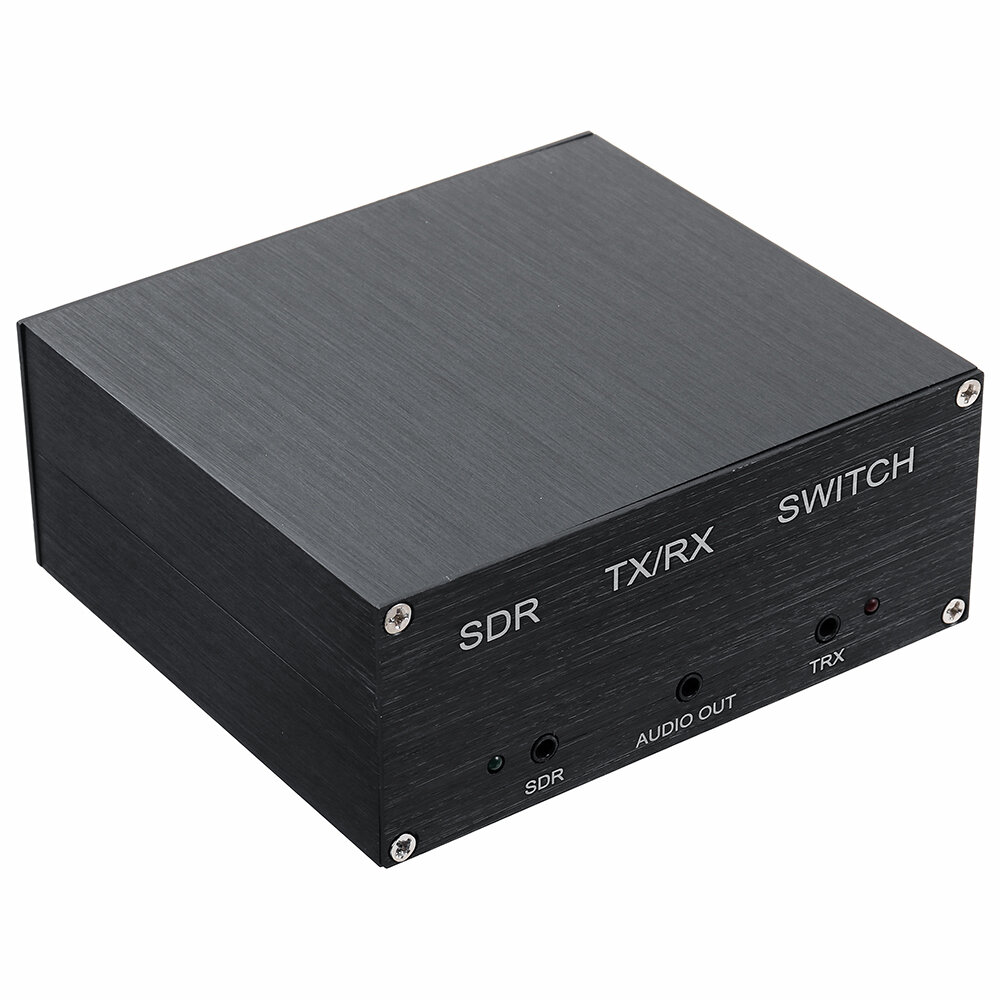
How to use one antenna at the same time for the radio and SDR:
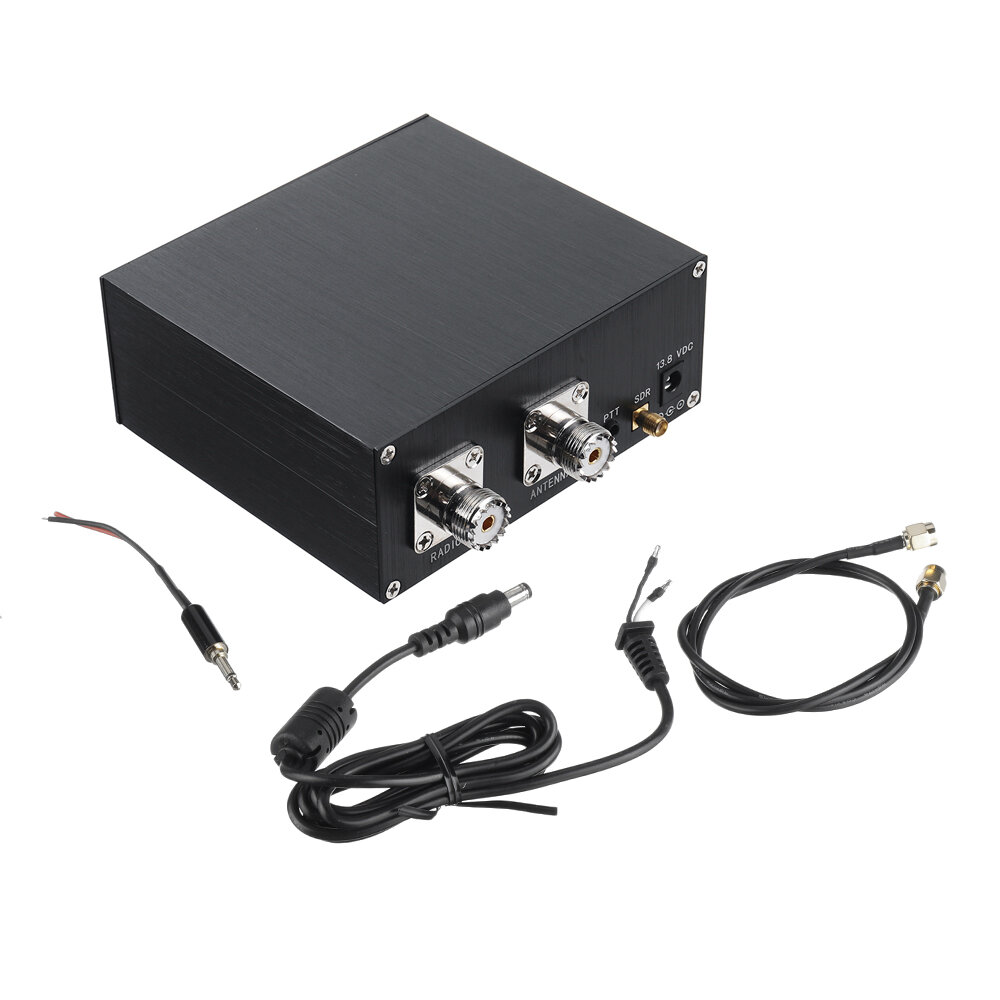
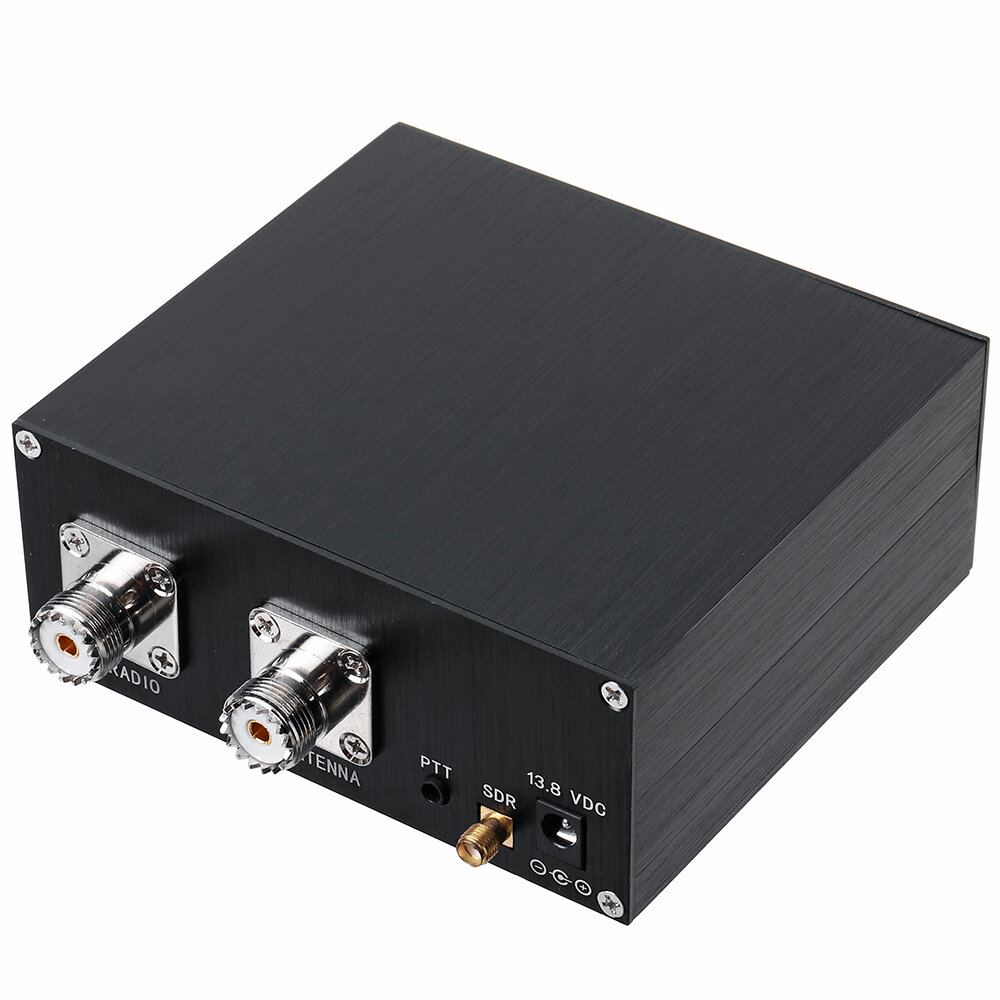
1. This sharer is a shared antenna between the radio and the SDR. After receiving the goods, open the box, remove the "jumper" in the middle, and change it to an automatic control state, that is: when the radio is transmitting, the SDR receiving channel is automatically closed, and the radio When not transmitting, the radio receives the signal together with the SDR.
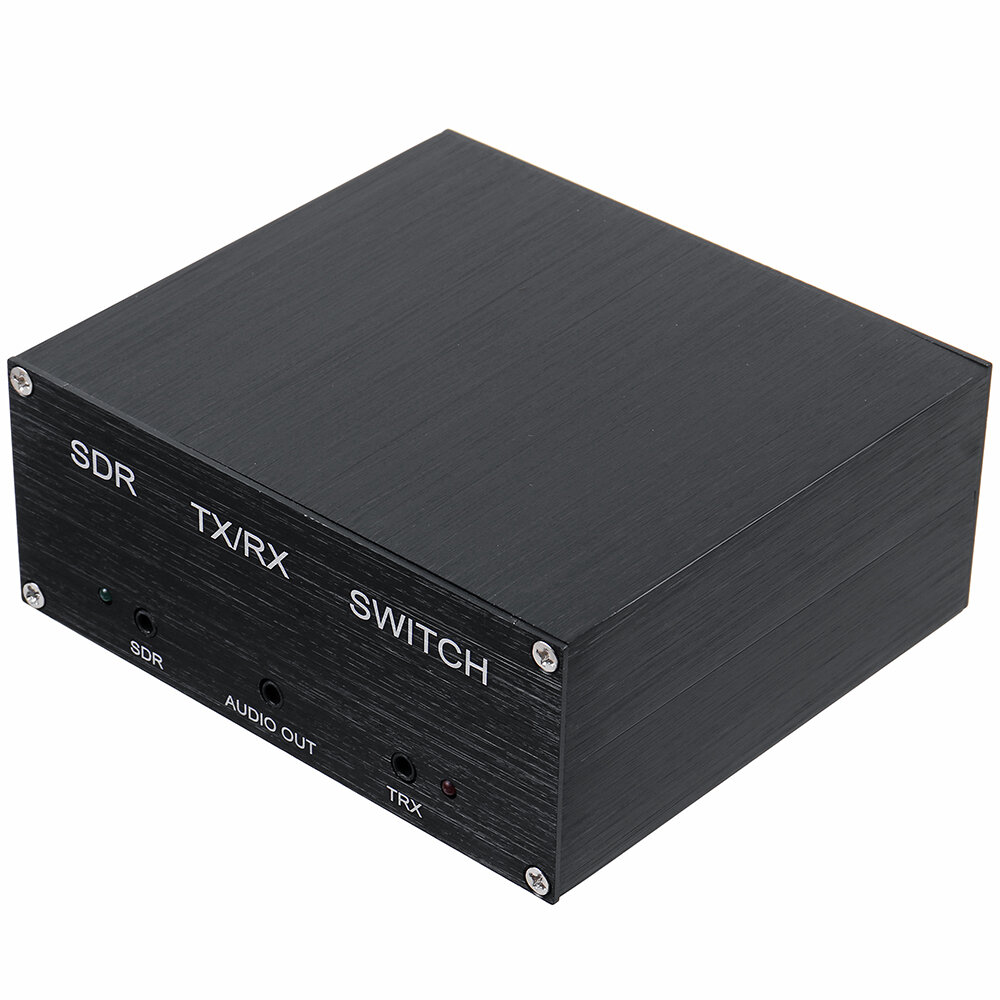
2. The jacks in front of the panel do not need to be wired, and the distributed PTT line does not need to be connected.
3. The rear jacks correspond to the power supply (VDC) interface, the radio (RADIO) interface, the SDR interface, and the antenna (ANTENNA) interface, respectively, and connect to the feeder according to each interface.
4. It is recommended to use the feeder with good shielding performance and cover it with a magnetic ring.
5. It is recommended that the sharer and the radio shell be grounded, because the radio may interfere with the SDR when transmitting.
6. After removing the jumper in the box, it is normal that the TRXlight on the panel is always on red; when the radio is not transmitting, the SDR on the panel is green and it is in normal working state; when the radio is transmitting, the SDR light on the panel will be off, and the SSB will follow the idea of communication. It is normal for the sound to change, the indicator light to flash and the relay to make a sound.
This is a very good panadapter switch so you can use your HF antenna (or upto 160Mhz) with your radio and your SDR receiver at the same time. This allows me to view a wide live bandscope on my computer using SDRUno and control the HF radio via Omnirig. To see this in action please search YouTube for Tech Minds.
This is a very good panadapter switch so you can use your HF antenna (or upto 160Mhz) with your radio and your SDR receiver at the same time. This allows me to view a wide live bandscope on my computer using SDRUno and control the HF radio via Omnirig. To see this in action please search YouTube for Tech Minds.
This is a very good panadapter switch so you can use your HF antenna (or upto 160Mhz) with your radio and your SDR receiver at the same time. This allows me to view a wide live bandscope on my computer using SDRUno and control the HF radio via Omnirig. To see this in action please search YouTube for Tech Minds.
arrived in about a week I moved the internal jumper to share the antenna. The device works perfectly. Sharing my DX Commander antenna with my Icom 706 transceiver and my SDRplay2. Now I have a waterfall display while using my old 706. Recommend this SDR Switch.
arrived in about a week I moved the internal jumper to share the antenna. The device works perfectly. Sharing my DX Commander antenna with my Icom 706 transceiver and my SDRplay2. Now I have a waterfall display while using my old 706. Recommend this SDR Switch.
arrived in about a week I moved the internal jumper to share the antenna. The device works perfectly. Sharing my DX Commander antenna with my Icom 706 transceiver and my SDRplay2. Now I have a waterfall display while using my old 706. Recommend this SDR Switch.
Tips:For questions about your order, place of delivery, product discount, taxation, delivery time, warranty, shipping, payment, exchange rate, and other questions unrelated to the product, please contact customer service.
showing 1-27 of 27|
Show Original
A part of the QA has been auto-translated.
0
Q:
The details sections says 100W output, but that's not possible with a power supply of 13.8V/200mA. Can anyone shed light on this?
The details sections says 100W output, but that's not possible with a power supply of 13.8V/200mA. Can anyone shed light on this?
It is 100W THROUGHPUT. 100W from transceiver out into the adapter and same 100W out to the antenna. Power supply (12V 200mA) only for internal circuitry (relay, switch, whatever is inside) 100W means you can not use with linear amplifier (500W-1kW)
It is 100W THROUGHPUT. 100W from transceiver out into the adapter and same 100W out to the antenna. Power supply (12V 200mA) only for internal circuitry (relay, switch, whatever is inside) 100W means you can not use with linear amplifier (500W-1kW)
Answered by es2dc on 13/04/2021Helpful (0)
0
Q:
The Specification is DC-160mhz. My unit will NOT perform above 50mhz -VERY high SWR.?
The Specification is DC-160mhz. My unit will NOT perform above 50mhz -VERY high SWR.?
trychanging internal jumper, if radio has a ppt socket 2x3.5mm plug it in both terminals the it switches as soon as you key
trychanging internal jumper, if radio has a ppt socket 2x3.5mm plug it in both terminals the it switches as soon as you key
Answered by SIFFLER on 24/01/2025Helpful (0)
0
Q:
Received my switch. When hooked up as required, I get a strong antenna signal at my SDR, but no antenna signal at the radio? I have tried two different coax patch cables from the switch to the radio with same results. Not just a bad signal, NO signal at the radio.
Received my switch. When hooked up as required, I get a strong antenna signal at my SDR, but no antenna signal at the radio? I have tried two different coax patch cables from the switch to the radio with same results. Not just a bad signal, NO signal at the radio.
Use a filter for interference , as the unit is only for displaying your tx through an SDR program, including.. Seeing other hams tx signals on the band, by use of your SDR programmes waterfall. And what ever you wish to qrp or not, the HF band your wanting to chase, including , monitoring your own TX, for other purposes.
Use a filter for interference , as the unit is only for displaying your tx through an SDR program, including.. Seeing other hams tx signals on the band, by use of your SDR programmes waterfall. And what ever you wish to qrp or not, the HF band your wanting to chase, including , monitoring your own TX, for other purposes.
Answered by B on 11/04/2022Helpful (0)
0
Q:
The device is working fine. I purchased it a few months back. But, I would like to learn more about the function and purpose of the three additional 3.5 mm jacks located on the opposite side of the device from where the two PL259 and SMA connections are located. The jacks are Labeled: J1 TRX, J2 AUDIO OUT, J3 SDR. Is there any available documentation which has the descriptions of these jacks? Best Regards, Thank You
The device is working fine. I purchased it a few months back. But, I would like to learn more about the function and purpose of the three additional 3.5 mm jacks located on the opposite side of the device from where the two PL259 and SMA connections are located. The jacks are Labeled: J1 TRX, J2 AUDIO OUT, J3 SDR. Is there any available documentation which has the descriptions of these jacks? Best Regards, Thank You
12V should be fine. It's close enough to 13.8V to still operate. It's probably a 12V circuit and just shown as 13.8V because that's the most common voltage used to power transceivers.
12V should be fine. It's close enough to 13.8V to still operate. It's probably a 12V circuit and just shown as 13.8V because that's the most common voltage used to power transceivers.
Answered by BG101216243 on 17/07/2021Helpful (0)
0
Q:
Is there some user/instruction manual available for this switching box please.... I am getting loads of feedback between my sdr and the radio when I try transmitting and also the relay is clicking like mad between tx to sdr when trying to transmit on ssb
Is there some user/instruction manual available for this switching box please.... I am getting loads of feedback between my sdr and the radio when I try transmitting and also the relay is clicking like mad between tx to sdr when trying to transmit on ssb
personally, I have a very bad experience with it. The seller declares use up to 160Mhz and that is misleading the customer. .It is usable up to 30 MHz, but for example already at 144 MHz it has an SWR of 1:10 !! and that is unacceptable
personally, I have a very bad experience with it. The seller declares use up to 160Mhz and that is misleading the customer. .It is usable up to 30 MHz, but for example already at 144 MHz it has an SWR of 1:10 !! and that is unacceptable
When I turn on the power on this device on the HF radio and SDR there is no signal. But at the VHF/UHF frequency when the power is turned on the radio there is radio signal and sound. Where's the problem ?
When I turn on the power on this device on the HF radio and SDR there is no signal. But at the VHF/UHF frequency when the power is turned on the radio there is radio signal and sound. Where's the problem ?
My guess - VHF and UHF are nor filtered by switch and goes through while HF is filtered by internal circuit. Open your SDR switch and try to move short black jumper to other position then it is now. Hope this helps
My guess - VHF and UHF are nor filtered by switch and goes through while HF is filtered by internal circuit. Open your SDR switch and try to move short black jumper to other position then it is now. Hope this helps
Answered by LY4SA on 26/06/2023Helpful (0)
0
Q:
Dear Eric, Thanks for the reply but I was referring to the udated QRM Eliminator version with TX RED Indicator when PTT works. See Aliexpress please.
Dear Eric, Thanks for the reply but I was referring to the udated QRM Eliminator version with TX RED Indicator when PTT works. See Aliexpress please.
Do you mean this item?> https://www.banggood.com/QRM-Eliminator-X-Phase-(1-30-MHz)-HF-Bands-Box-p-1828030.html?rmmds=detail-topright-recommendation&cur_warehouse=CZ&trace_id=19ee1657942637045
Do you mean this item?> https://www.banggood.com/QRM-Eliminator-X-Phase-(1-30-MHz)-HF-Bands-Box-p-1828030.html?rmmds=detail-topright-recommendation&cur_warehouse=CZ&trace_id=19ee1657942637045
Answered by Eric on 15/07/2022Helpful (0)
0
Q:
I am not able to pass 100w on all bands. 10m is only 40w, 6m is 20w, and 2m is 5w. Am I doing something wrong? SWR is just fine.
I am not able to pass 100w on all bands. 10m is only 40w, 6m is 20w, and 2m is 5w. Am I doing something wrong? SWR is just fine.
There are no instructions how to connect the 3.5 mm jack to a Yaesu FT991A 8-pin DIN breakout cable Sandy. Please show wiring diagram or where in the instructions it can be found.
There are no instructions how to connect the 3.5 mm jack to a Yaesu FT991A 8-pin DIN breakout cable Sandy. Please show wiring diagram or where in the instructions it can be found.
It seems that safest thing to do is also connect the PTT lead, my PTT connection is a standard 3.5mm 2 terminal jack, I already have a 2 x 3.5mm jack lead could I use that rather than wire up the supplied lead with another 3.5mm jack?
It seems that safest thing to do is also connect the PTT lead, my PTT connection is a standard 3.5mm 2 terminal jack, I already have a 2 x 3.5mm jack lead could I use that rather than wire up the supplied lead with another 3.5mm jack?
Follow Up, About the 3 jacks: J1 SDR , J2 AUDIO, J3 TRX These jacks all appear to be 3.5 mm commonly used for speakers / audio. Question: Is J1 (SDR) jack for input of sound to the box? Question: Is J2 (AUDIO) for output of that signal to speakers? Question: Is J3 (TRX) for a switch to control signal from J1 to J2? Question: Are these Stereo (3 connections) on jack, or mono (2 connections)
Follow Up, About the 3 jacks: J1 SDR , J2 AUDIO, J3 TRX These jacks all appear to be 3.5 mm commonly used for speakers / audio. Question: Is J1 (SDR) jack for input of sound to the box? Question: Is J2 (AUDIO) for output of that signal to speakers? Question: Is J3 (TRX) for a switch to control signal from J1 to J2? Question: Are these Stereo (3 connections) on jack, or mono (2 connections)
Hello, I appreciate your answer regarding the purpose of the 3 jacks. But, I am confused by the answer. The SDR is connected to the USB port on the computer. The receive audio is created within the computer, and is routed directly to the speakers attached to the computer. I don't see how that audio signal could exist within the antenna switch. I mean the antenna connections PL259 in and PL259 out, and the SMA connection are not yet audio, until those signals have been processed by the SDR and computer, and the transceiver. So, perhaps one or more of the jacks are inputs for audio? Clarification would be appreciated. Best Regards, Thank you
Hello, I appreciate your answer regarding the purpose of the 3 jacks. But, I am confused by the answer. The SDR is connected to the USB port on the computer. The receive audio is created within the computer, and is routed directly to the speakers attached to the computer. I don't see how that audio signal could exist within the antenna switch. I mean the antenna connections PL259 in and PL259 out, and the SMA connection are not yet audio, until those signals have been processed by the SDR and computer, and the transceiver. So, perhaps one or more of the jacks are inputs for audio? Clarification would be appreciated. Best Regards, Thank you






 Direct purchase from the factory

![[US DIRECT] ATOMSTACK A5 M50 APP Control Dual-Laser Laser Engraving Cutting Machine Laser Engraver Cutter 5.5W Output Power Fixed-Focus 304 Mirror Stainless Steel Engraving DIY Laser Marking for Metal Wood Leather Vinyl](https://static.roymall.com/d/file/mall/titlepic/235/67803406-41f3-499a-afb7-154990584ff8.jpg?x-oss-process=image/resize,w_237/quality,Q_80/format,webp)

![[EU/US Direct]Raiser for LONGER RAY5 Engraver](https://static.roymall.com/d/file/mall/bigpic/235/65e9b76d-574a-4b4b-9c6c-02db18b89460.jpg?x-oss-process=image/resize,w_237/quality,Q_80/format,webp)
![[US/UK Direct] Refurbished ULTIMEA Nova S70 3.1.2 Soundbar 390W True Dolby Atmos Soundbar BassMax 4K Dolby Vision HDR Passthrough 3EQ Modes Wired Speaker Subwoofer](https://static.roymall.com/d/file/mall/titlepic/235/e1440062-c78c-4565-8aa7-f8857d749771.jpg?x-oss-process=image/resize,w_237/quality,Q_80/format,webp)







 Multi Rotor Parts
 Cadeau gratuit
 Politique d'expédition
 Politique de retour